It is now even easier to support FRAME with Amazon Smile on the Amazon App
Web Browser
To support FRAME via your web browser you just need to register once by clicking this link
Then go to https://smile.amazon.co.uk/ when you go to shop at Amazon and that’s it!
Amazon App
You can now support FRAME through Amazon smile directly from the Amazon app with just a few easy steps
- Register for Amazon Smile by simply following this link
- If you have not already, download the amazon app from the Apple App store
OR The Google Play Store
- Setting up the Amazon App
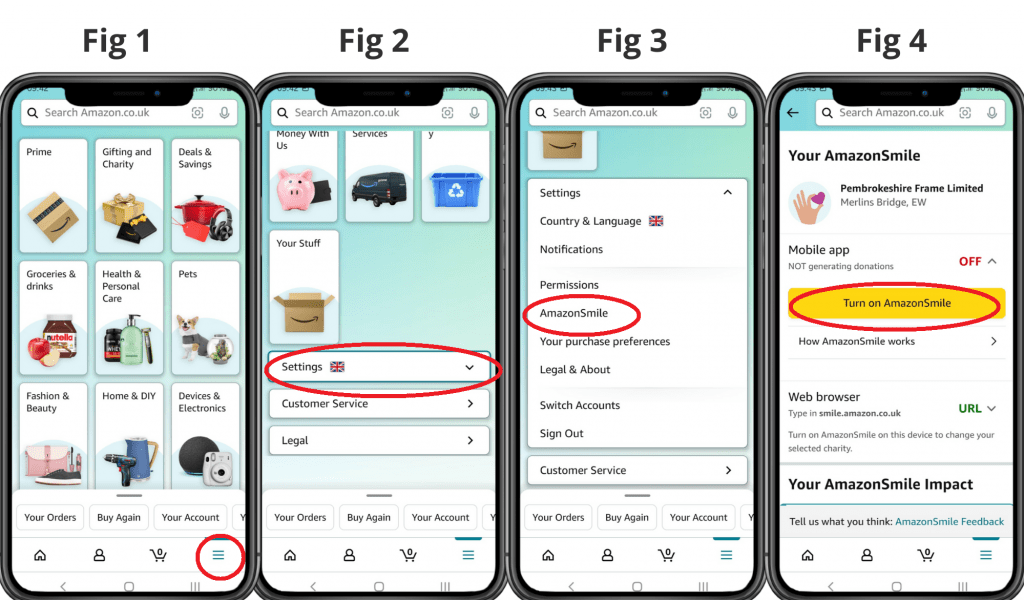
- Click on the main menu button (☰) (Fig 1 See Below)
- On the main menu, scroll to the bottom and click on settings (Fig 2)
- Click on AmazonSmile (Fig 3)
- Click on the ‘Turn on AmazonSmile’ button (Fig 4)
- Finally confirm by pressing the ‘Turn on AmazonSmile’ button (Fig 5)
Then you are all set! You will get a notification twice a year to re-enable AmazonSmile on your app so please do this. Thank you for your continued support.